A quick Safari settings update may help. View Steps

Readiness Check
Readiness Check Instructions
- Watch the Getting Started video.
- Review Readiness Check Introduction.
- Choose an Option and follow the instructions.
Please note: We are continually working to improve your Early Access experience. While the overall process remains the same, some visual elements may appear different as we make updates.
Readiness Check Introduction
Purpose of the Readiness Check:
- Helps determine gaps in your student’s readiness for
Algebra 1: Principles of Secondary Mathematics. - Identifies the Skills Lessons that will help fill in any
gaps you discover.
There are three options for using the Readiness Check:
| Option 1 (Recommended) | Option 2 | Option 3 |
|---|---|---|
| Skills Assessment Skills Analysis Skills Inventory Chart Skills Lessons |
Skills Inventory Chart Skills Lessons |
Skills Lessons |
Option 1: Skills Assessment and Analysis with Skills Inventory Chart
This option includes a Skills Assessment, Skills Analysis, and
Skills Inventory Chart.
| Skills Assessment | Includes 24 math problems designed to identify skills your student may need to review or practice before starting algebra. |
| Skills Analysis | After the Assessment, you can perform the Skills Analysis and use it to complete the Skills Inventory Chart. |
| Skills Inventory Chart | The Skills Inventory Chart can then be used to determine which Skills Lessons we recommend for your student. |
Complete the Skills Assessment
Skills Assessment and Formula Sheet
- Click
Skills Assessment with Formula Sheet to
print it for your student. - Explain to your student that the Skills Assessment is NOT a
test. Rather it is simply a way to identify skills the
student may need to review or practice so they can be
successful in algebra. - Have your student complete the problems on their own.
However, if needed, you may read the problems out loud to
your student. - Give your student:
- Printed Skills Assessment
- Printed Formula Sheet
- Go over these instructions with your student:
- Do use the Formula Sheet.
- Do show your work.
- Do check your work.
- Do not use a calculator.
- Do your best, even if you are
unsure how to solve a problem. It is important to
attempt and to persevere through each problem.
Complete the Skills Analysis
- Click Skills Assessment Solutions and
Skills Inventory Chart
to print them. If you prefer, you can just open the
solutions on-screen. - Gather your student’s completed Skills Assessment pages and
sit with your student. - As you go through the Skills Assessment together,
regardless of the results:- Stay Positive.
- Praise your student’s hard work and perseverance.
- Remind your student that the purpose of the
assessment is strictly to uncover gaps.
- For each problem, determine:
Can the student explain their work? Is the student’s solution correct? Ask your student to explain their work, as you
determine if they understood how to solve the
problem.Check that the student’s solution is correct. - If you are comfortable with the
material, ask questions to clarify your
student’s explanation. - Use the notes provided in the Solutions
as question prompts.
- Encourage your student to identify and
correct mistakes verbally or on paper.
- If you are comfortable with the
- On the student’s pages, circle the problem number for any
problem your student is not able to adequately explain or
did not get the correct solution even after attempting to
correct mistakes. - On the Skills Inventory Chart, scan the
Problem column to find each problem number
you circled and mark – in the
+/– column. Note: Problem
numbers may be listed for more than one skill.
Skills Analysis Results
- If you have no – in your Skills Inventory
Chart, you should feel confident that your student is ready
to start
Algebra 1: Principles of Secondary Mathematics! You
can end the Readiness Check at this point. - If you have – for any skills, do not panic!
You have the tools you need to bridge those gaps…
Complete the recommended Skills Lessons
- For any skill that you have marked – in
your Skills Inventory Chart, find that skill under
Bridge Materials: Pre-Algebra to
Algebra 1: Principles of Secondary Mathematics.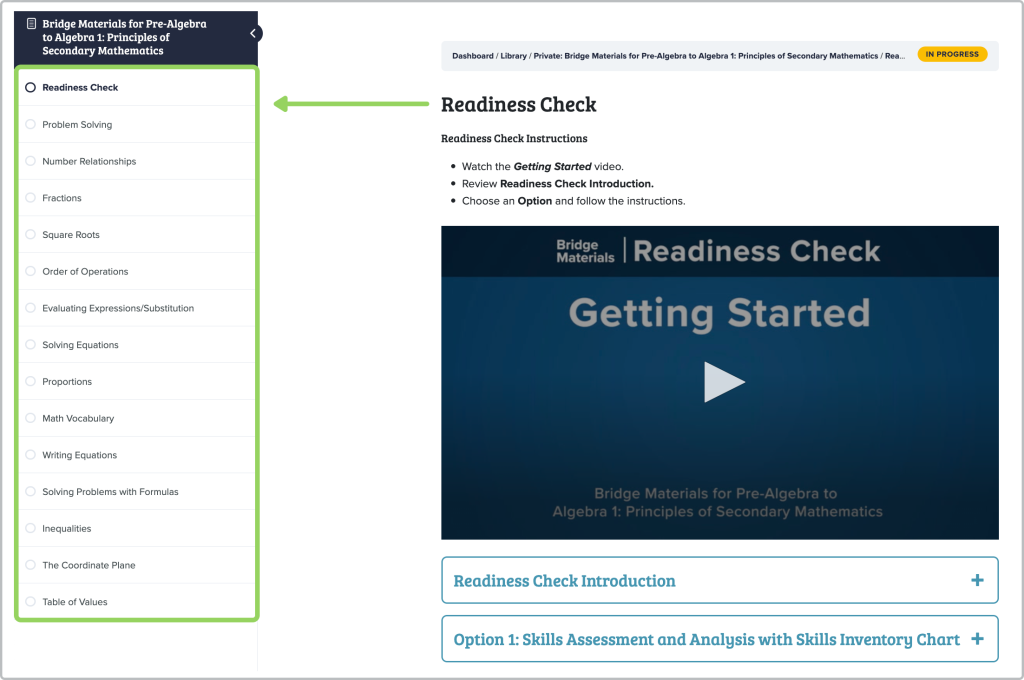
- Click the skill and follow the on-screen instructions to
complete the lesson.
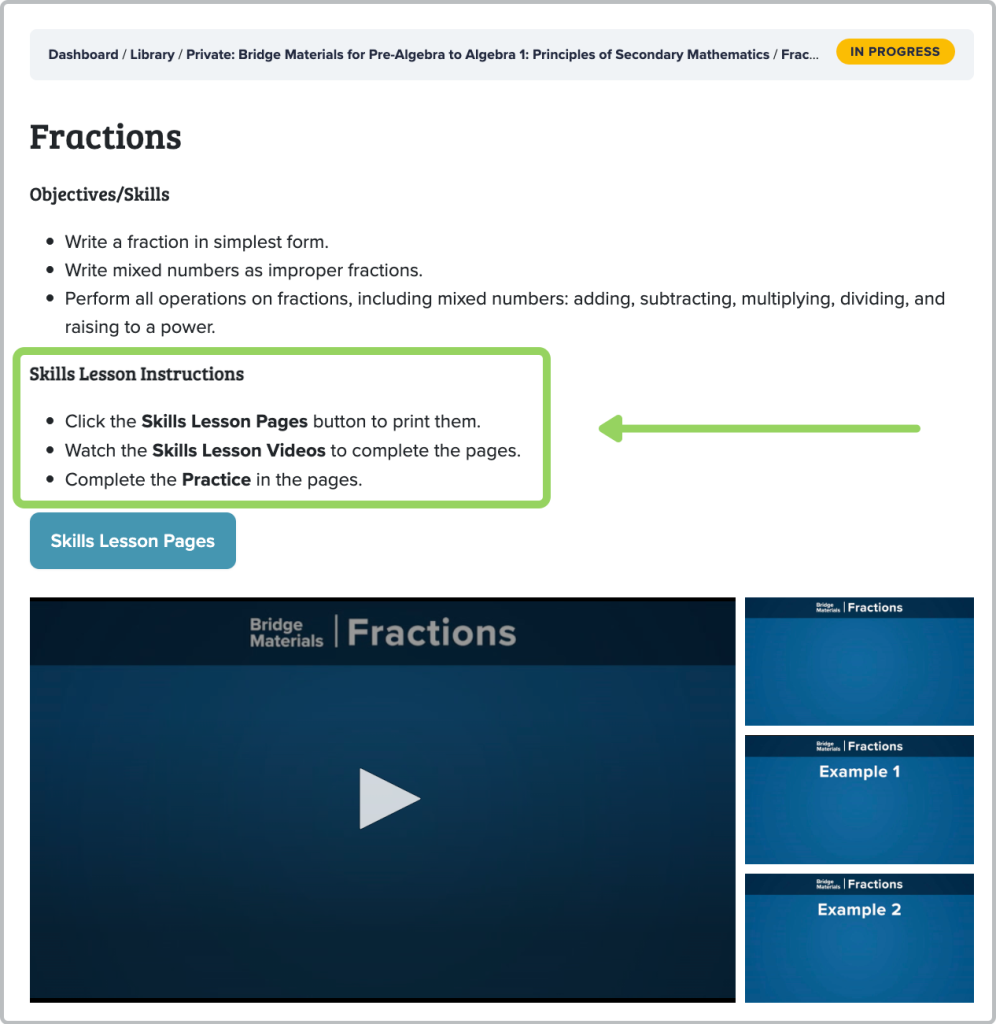
- Find Solutions for the lesson below the
videos. Use the Solutions to check student work, giving
consideration to your student’s effort and level of comfort
with the skill.- If your student had several or most problems correct
and/or you both feel confident about their work,
they can move on to another skill. - If your student struggled, had many incorrect
answers, and/or did not show their work, consider
having them redo a few problems and review them
again until you both feel confident.
- If your student had several or most problems correct
- When your student completes a Skills Lesson, have them
continue to another skill as indicated by a
– mark in your Skills Inventory Chart.
Please keep in mind that your student may not need to complete
ALL of the Skills Lessons in the Bridge Materials! And these
lessons are all optional.
The Skills Lessons are condensed and independent. Your student
does not need to complete them in the order they are presented.
Option 2: Student Mastery and Skills Inventory Chart
This option includes the Skills Inventory Chart that gives you
and your student the opportunity to take stock of their math
skills that are foundational for algebra. The chart can then be
used to determine which Skills Lessons we recommend for your
student.
Complete the Skills Inventory Chart
Note: You can complete the inventory alone or
with your student.
- Click Skills Inventory Chart to print it.
- For each skill, thoughtfully and honestly decide if your
student has mastered it. - In the +/– column, for each skill mark +
for mastered and – for not mastered.- If you are not sure what an objective means, mark –
for that skill. - If you are not sure if your student has mastered a
skill, mark – for that skill - If you do not feel all objectives for a skill have
been mastered, mark – for that skill.
- If you are not sure what an objective means, mark –
Skills Inventory Results
- If you were able to mark a + for all 14 skills, you should
feel confident that your student is ready for
Algebra 1: Principles of Secondary Mathematics! You
can end the Readiness Check at this point. - If you were not able to mark a + for a skill, do not panic!
You have the tools you need to bridge those gaps…
Complete the recommended Skills Lessons
- For any skill that you have marked – in your Skills
Inventory Chart, find that skill under Bridge Materials:
Pre-Algebra to Algebra 1: Principles of Secondary
Mathematics. - Click the skill and follow on-screen instructions to
complete the lesson. - Find Solutions for the lesson below the
videos. Use the Solutions to check student work, giving
consideration to your student’s effort and level of comfort
with the skill.- If your student had several or most problems correct
and/or you both feel confident about their work,
they can move on to another skill. - If your student struggled, had many incorrect
answers, and/or did not show their work, consider
having them redo a few problems and review them
again until you both feel confident.
- If your student had several or most problems correct
- When your student completes a Skills Lesson, have them
continue to another skill as indicated by a
– mark in your Skills Inventory Chart.
Please keep in mind that your student may not need to complete
ALL of the Skills Lessons in the Bridge Materials! And these
lessons are all optional.
The Skills Lessons are condensed and independent. Your student
does not need to complete them in the order they are presented.
Option 3: Your Choice of Skills Lessons
With this option, you can simply select skills lessons from the
available list under
Bridge Materials: Pre-Algebra to
Algebra 1: Principles of Secondary Mathematics.
Complete Skills Lessons of Your Choice
- Under
Bridge Materials: Pre-Algebra to Algebra 1:
Principles of Secondary Mathematics, click a skill
title.
- Follow on-screen instructions to complete the lesson.
- Find Solutions for the lesson below the
videos. Use the Solutions to check student work, giving
consideration to your student’s effort and level of comfort
with the skill.- If your student had several or most problems correct
and/or you both feel confident about their work,
they can move on to another skill. - If your student struggled, had many incorrect
answers, and/or did not show their work, consider
having them redo a few problems and review them
again until you both feel confident.
- If your student had several or most problems correct
- When your student completes a Skills Lesson, have them
continue to another skill of your choice.
Please keep in mind that your student may not need to complete
ALL of the Skills Lessons in the Bridge Materials! And these
lessons are all optional.
The Skills Lessons are condensed and independent. Your student
does not need to complete them in the order they are presented.